Tools

Everyprompt,oneshortcutaway.

Powerful AI tools that work in any app. Run your shortcut, then press 1–5 to fire a tool — right where you're already writing. No copy-paste. No context switching.

ECHO

1Translate
2Reply
3Clean Up
4Summarize
5Write as Email
Or type your own instruction…

Every tool

Five tools. And room for your own.

Select the text, press your shortcut, then the number. Here's what comes back.

1

Translate

Read what landed in your inbox, or send it back in their language. Pick from your own list of languages.

Selected text

Bonjour, je vous confirme notre rendez-vous de jeudi à 14h. Pouvez-vous m’envoyer l’ordre du jour avant ?

Press 1

Translate → English

Hello, I’m confirming our meeting on Thursday at 2pm. Could you send me the agenda beforehand?
How Translate works
2

Reply

Select the message you were sent and get an answer back, ready to send.

Selected text

Are you still able to join the kickoff on Monday? Happy to move it to Tuesday if that’s easier for you.

Press 2

Reply

Monday still works on my end — no need to move it. I’ll see you at the kickoff.

How Reply works
3

Clean Up

Typos, grammar and punctuation fixed — in your words, not rewritten into someone else’s.

Selected text

hey team quick update — the desing is almost finish, i just need to reveiw teh copy and than we can ship it tomorow

Press 3

Clean Up

Hey team, quick update — the design is almost finished. I just need to review the copy and then we can ship it tomorrow.

How Clean Up works
4

Summarize

A long thread, doc or article down to what you actually need to know.

Selected text

Following our review, the launch has moved to 12 March. Marketing needs final assets a week ahead, so the design freeze is now 5 March. Pricing is unchanged.

Press 4

Summarize

  • Launch moved to 12 March.
  • Design freeze 5 March — assets due a week early.
  • Pricing unchanged.
How Summarize works
5

Write as Email

Throw your rough notes at it and get a proper email out the other side.

Selected text

cant make friday, moving deadline to weds — need the design files from marc first

Press 5

Write as Email

Hi Marc, I’m not going to make Friday, so I’m moving the deadline to Wednesday. Could you send the design files across before then? Thanks!

How Write as Email works

Other use cases?

Type your own instruction straight into the panel — anything you want doing to the text. Keep the ones you like: save a prompt as your own tool and it joins the list with its own number key, ready every time.

Rewrite this as a polite decline

Used it twice? Save it — it becomes tool 6.

Make AI yours

Create your own prompts and shape Echo around the way you work.

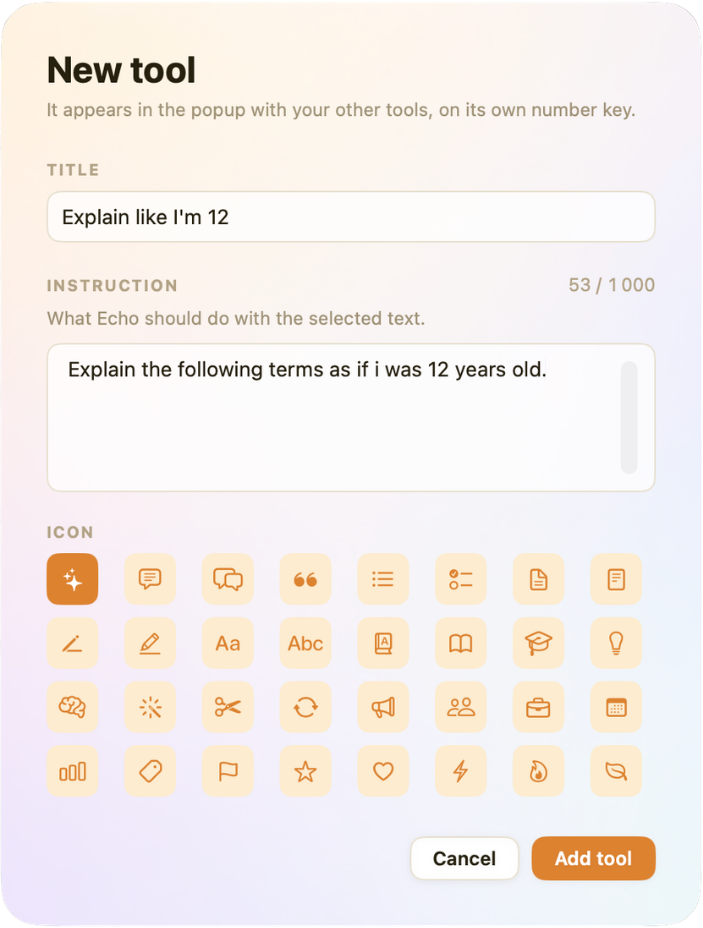
  • Explain like I’m 12
  • Rewrite as a polite decline
  • Turn this into bullet points
  • Make it sound more confident
  • Shorten to a single sentence
  • Draft a LinkedIn post from this
Echo’s New tool editor: a title, the instruction Echo should run, and an icon to pick.

ECHO

1Explain like I’m 12
2Translate
3Reply
4Clean Up
5Summarize
Or type your own instruction…

The details

More ways to use Echo.

The small touches that make Echo feel like it was built for the way you work.

Echo, don't break your flow.

Echo runs natively on Mac.

Download for macOS